

Before You Cap Your Team's AI Spend, Find Out What You Could Save

A founder recently celebrated their team’s $16k Claude Code bill on LinkedIn, and set a target to spend $60k for the next month. His team was moving faster and getting more done. But my question is how much of that spend was actually necessary. Unless you know the kind of work that went into generating them, the number is arbitrary. That $16,000 could mean that his team build and shipped something ambitions in a fraction of the time it would have taken otherwise or they could have spent thousands on routine tasks that didn’t require the most expensive model or it can sit somewhere in between.
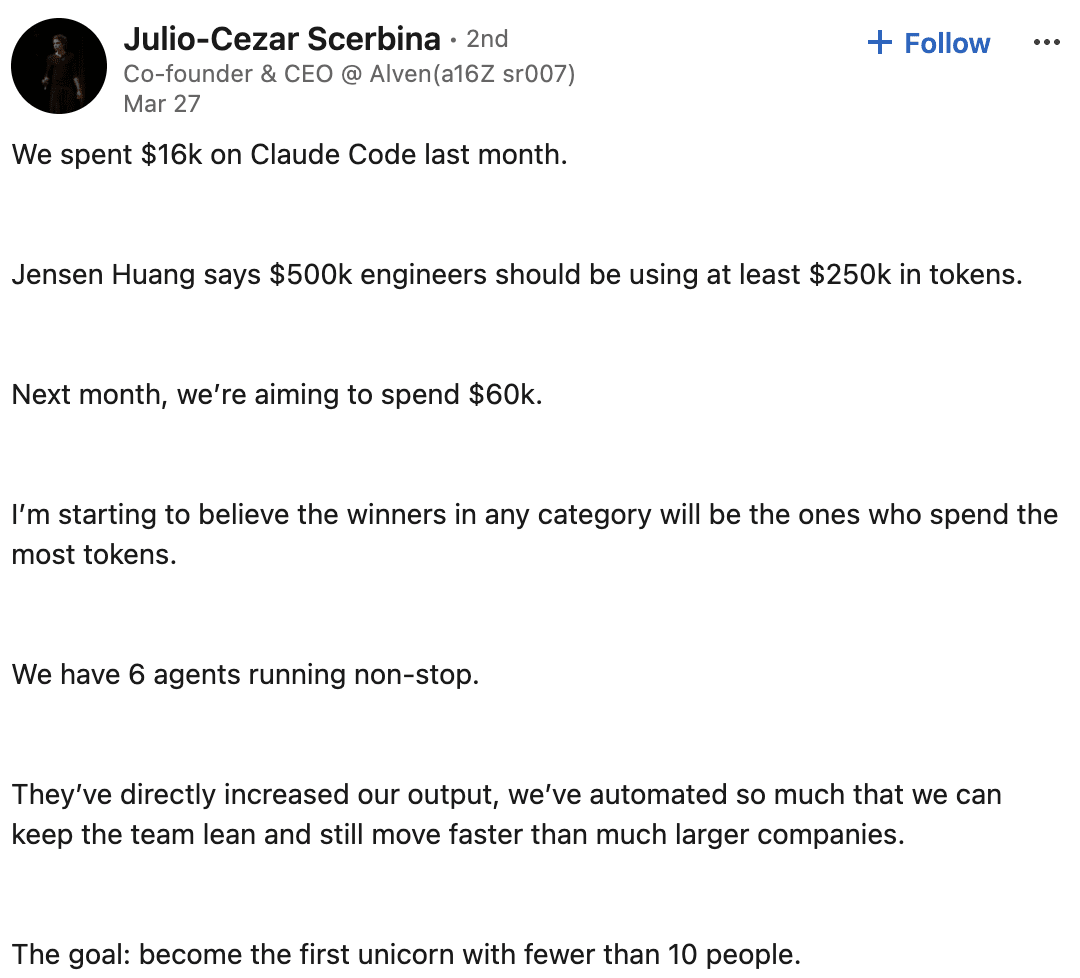
Spending more on AI isn’t necessarily bad. The biggest question is: did that spend produce valuable work? Did you use a hammer for the job that required the hammer or a sledgehammer for a nail? Could you have done that work for $10,000 instead? Most teams don’t know the answer to that question because they measure the actual spend rather than how much they need to spend.
Engineers want to build, and switching models breaks their flow
Think about an engineer who’s been working on a complicated feature all morning. They’re using Fable because they need its reasoning capabilities to work through architecture decisions, troubleshoot a difficult bug, and figure out how everything fits together. But once they work through the problem, they move on to reading files, checking Git status, updating documentation, and preparing a summary of their changes. And they’re still using Fable.
They could switch to a lighter-weight model for those smaller tasks, but that breaks the momentum they’ve built. Stopping to think about model selection is another interruption they don’t need. We shouldn’t be asking engineers to stop in the middle of a productive session and calculate how much each request is costing the company. But if we multiply those decisions across an engineering team, hundreds of sessions, and thousands of requests, the cost adds up, even when nobody is doing anything particularly unreasonable.
The solution is to manage AI spending in a way that doesn’t disrupt engineers’ workflow.
Before you set a spend cap, forecast where the team is headed
In July, the Financial Times reported on Amazon’s $1.8 million Claude overrun that ran 860% over budget and went unnoticed for five months. The knee-jerk reaction is to add spend caps. Sure, they have their place along with chargebacks and approval processes, but those controls don’t tell you whether the models your team is using are the right ones for the work or give you room for improvements in forecasting and planning. The key is to anticipate potential overruns and manage spending proactively rather than reactively.
You don’t have to put an arbitrary cap on your team’s spending or add friction to their workflow. You should be looking at where the team is headed in terms of spend and making informed decisions based on forecasts rather than reacting to overruns after the fact. By anticipating potential overruns, you avoid reactionary decisions and can take proactive measures to optimize resource allocation, adjust priorities, or provide guidance to the team without disrupting their flow.
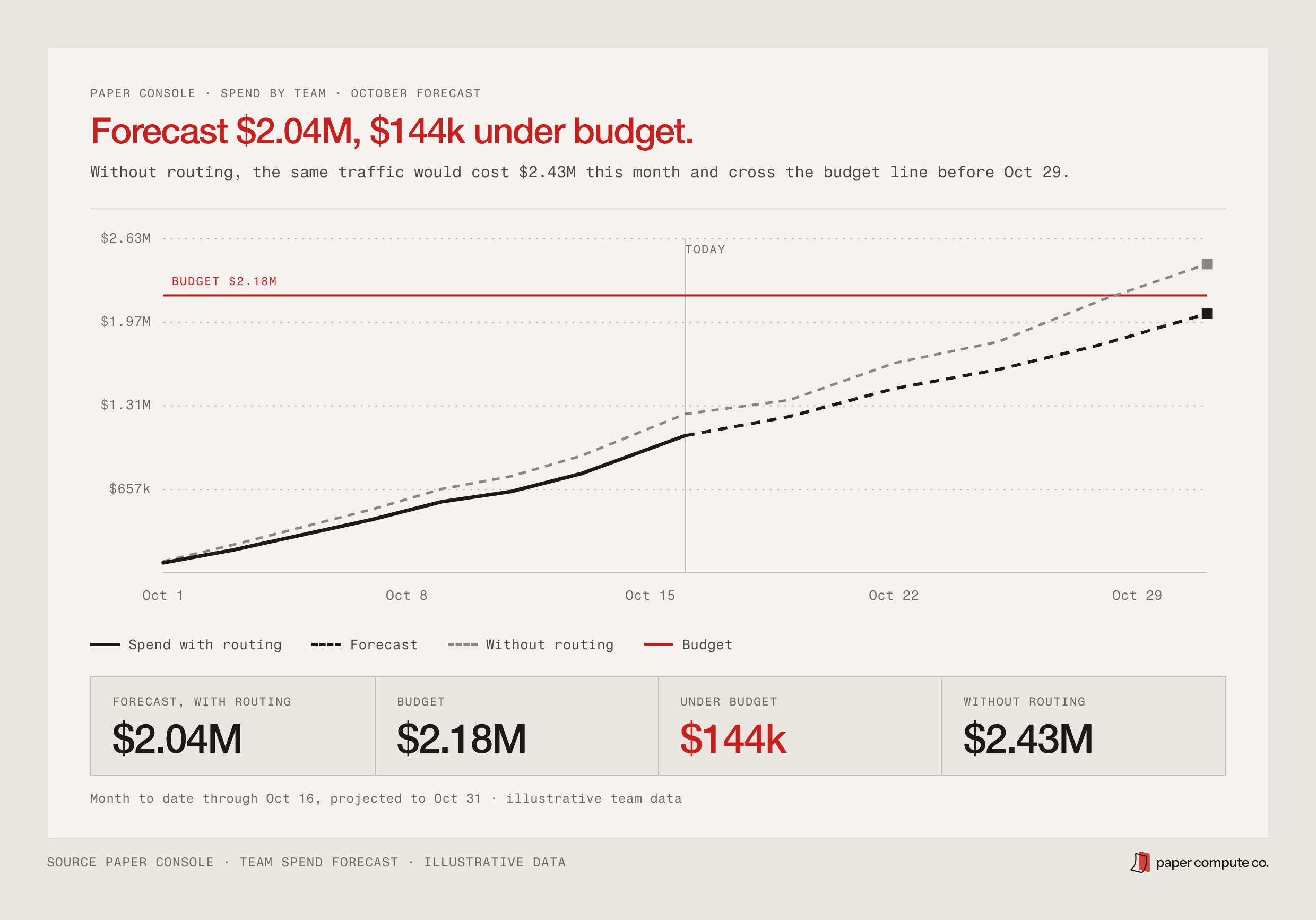
Imagine your organization has a monthly AI budget of $10,000. By looking at what your teams have spent so far and their current rate of usage, you should be able to forecast whether you’ll stay within budget or risk an overrun. Team-level forecasts also make it possible to identify when one team is approaching its budget, when spending suddenly spikes, or when a disproportionate amount of usage is coming from a handful of engineers.
That creates an opportunity for a much better conversation. Instead of telling a team they’ve spent too much and need to cut back, you can show them where they’re headed, understand what’s driving the spending, and look for opportunities to improve before there’s a problem.
What if the work did not need that much spend? Introducing Routable Spend
Forecasting your team’s spend only solves one part of the problem though. Routable spend is money spent on powerful AI models for work that a lighter-weight model could handle just as well. Understanding that number can help you identify opportunities for improvement.
For instance, let’s say your engineer is using Fable to build a new feature. They need its reasoning capabilities to work through some complicated architecture decisions, but they’re also using it to read files, check Git status, and update documentation. Those requests don’t necessarily need the same model. And because tapes captures your agent sessions, including the prompts, model choices, tool calls, and costs, Paper can use that history to identify spending associated with work that might be better suited to a more efficient model.
Consider a simple example. An engineer needs to summarize an incident for a public status page:
“Summarize this incident thread into three bullets for the status page: checkout latency spiked at 09:40, rollback of payments-api v412 at 10:05, latency back to normal by 10:20.”
In one column, we see the request send and get the actual cost. To determine the potential savings, we compare it with an alternative routing approach. In the case below,the router selects Qwen 3.5 Small for a 98% cost reduction.
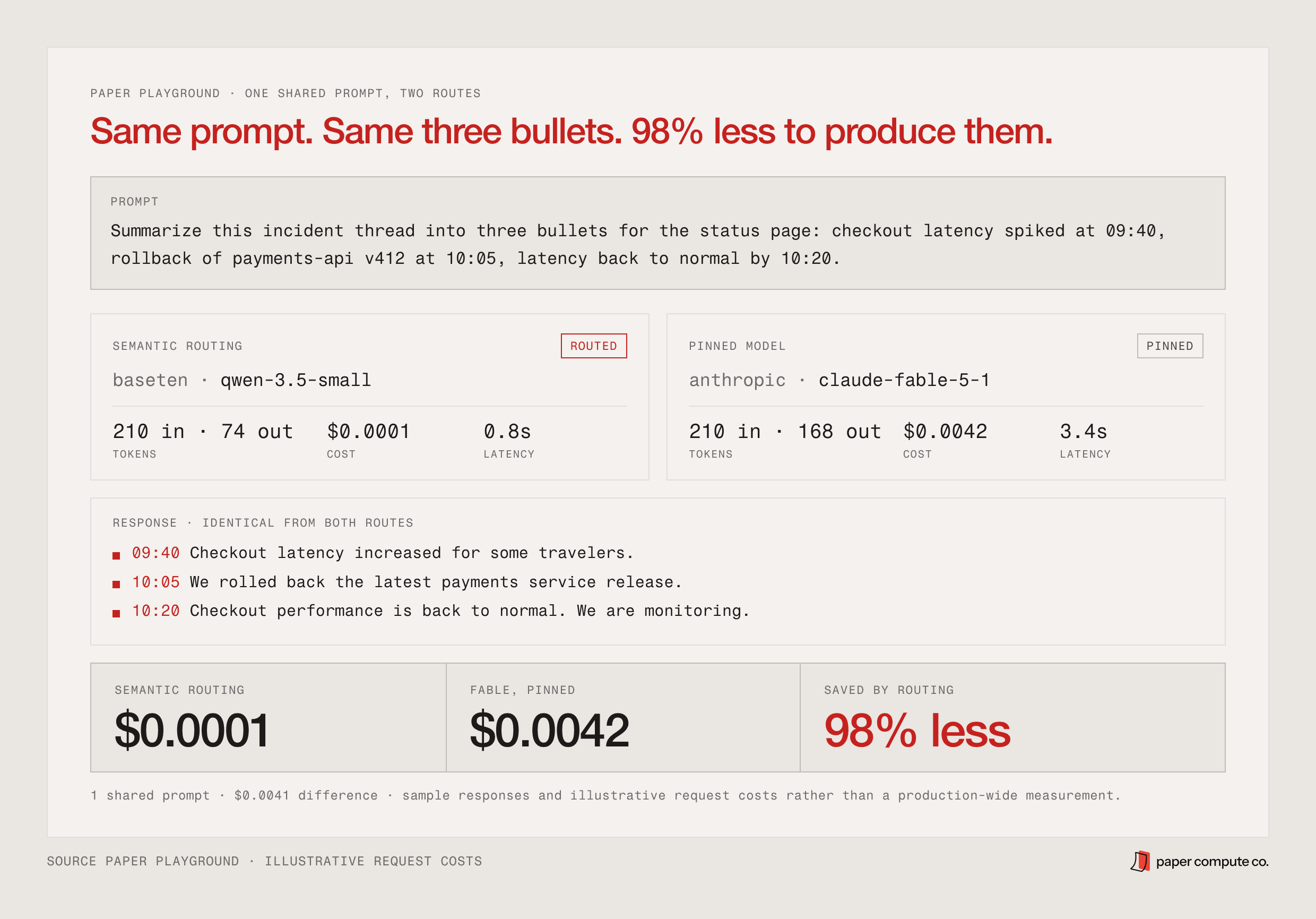
You can use real session data to understand which tasks are good candidates, evaluate alternatives, and make model decisions based on evidence. As you look at your organization’s Routable Spend, you might discover that 10% of your frontier model spend is routable and could be optimized by routing to more efficient models.
Make the right model the easy choice
Even the companies investing heavily in AI are starting to recognize the value of making smarter model decisions. In May 2026, Marc Benioff said he expects Salesforce to spend $300 million on Anthropic tokens this year, nearly all of it on coding, and in the same conversation argued for an intermediary layer that sends hard reasoning to Claude and simpler tasks to cheaper models.
That’s what an AI gateway with Paper makes possible. Once your team has identified opportunities and tested which models work best for different kinds of requests, you can translate those decisions into routing policies. Instead of asking engineers to choose a model every time they send a request, the gateway can make that decision for them. This is a big part of how we think about Paper Compute as the control plane for AI enablement.
tapes captures the work your agents are doing. Paper Console helps teams understand their spending and identify opportunities to improve it. The Gateway gives teams a place to apply model choices and policies consistently.
Spend where it matters: AI Enablement
For a long time, controlling costs has meant setting limits. Give a team a budget, tell them how much they’re allowed to spend, and make someone responsible when they exceed it. But as AI becomes part of everyday engineering work, there’s an opportunity to approach spending differently.
Start by understanding what your teams are doing and where their spending is headed. Identify the work that could run on more efficient models, test those alternatives, and apply routing policies that make the right choices easier.
Then keep measuring.
The goal is to create an environment where engineers can use the tools they need without constantly thinking about model pricing, while engineering leaders have the visibility to understand costs and make informed decisions before budgets become a problem.
That $16,000 Claude Code bill from the beginning of this story might have been worth every penny. Or there might have been thousands of dollars in spending that could have been avoided. Wouldn’t you want to know? The goal is to stop paying for intelligence you don’t need, so you can afford it when you do.
Frequently asked questions
What is routable spend?+
How is routable spend different from an AI spend cap?+
Why do engineers default to the most expensive model for everything?+
Does semantic routing hurt output quality?+
How does a spend forecast help before the bill arrives?+
What does Paper Compute do for AI cost management?+
Related reading
From the blog
Start with paper
Turn every session into knowledge at team scale.