

Definition
An LLM proxy is a network process that intercepts AI-API calls between a tool and a model provider, records requests and responses, and can optionally apply policy before forwarding the call to the destination.
An LLM proxy is a network process that sits between an AI tool and a model provider. Instead of sending requests directly to Anthropic, OpenAI, Google, or a self-hosted endpoint, the tool routes those requests through the proxy first. A basic proxy forwards traffic. A capture-oriented LLM proxy also records requests and responses, preserves streaming behavior, and can optionally apply policy before forwarding the call to the destination.
What an LLM proxy does and why it matters
| Intercept | Receive the request the tool sent, in the provider wire format. |
|---|---|
| Record | Write prompt metadata, model, timestamp, and configured request fields to a durable archive. |
| Policy | Apply allowed-models, redaction, rate-limit, routing, or cache-safety rules. |
| Forward | Send the request to the real provider — preserving streaming. |
| Record response | Capture configured response fields, reassemble streams when needed, and return output to the tool. |
Why an LLM proxy works better than per-tool SDK integration
The first question every team asks: why a proxy, when an SDK could record the same data? Two reasons.
The first is coverage. SDK integration is per-tool. A proxy integration is per-network. Five AI tools in the org means five SDK integrations or one proxy. The next tool a team adopts means another integration or zero work.
The second is independence. SDKs ride along with the tool. When the tool updates, the SDK can break. When the tool’s vendor changes the wire format, the SDK lags. A proxy speaks the provider’s wire format directly, so it depends on the same network surface the tool already uses. That surface is usually more stable than a per-tool SDK integration, though provider API changes can still require proxy updates.
A single captured proxy session can contain hundreds of messages across multiple model tiers. Capturing model switches and fallback events requires no SDK; the proxy sees the model field on every routed request.
How an LLM proxy intercepts and records inference traffic
The mechanics depend on the tool, but the patterns are small in number.
| Mechanism | How it works | Where it's used |
|---|---|---|
| Environment variable | Tool reads ANTHROPIC_API_URL or equivalent; proxy sets it to localhost | Any tool that reads a base URL env var (e.g., Claude Code, Cursor, custom agents) |
| Config file | Tool reads a config that points at the proxy | IDE extensions, internal services |
| HTTP CONNECT | OS-level proxy setting that the HTTP client honors | Browsers, generic clients |
When the proxy preserves streaming, error behavior, and provider-compatible request formats, the user-visible behavior is unchanged. The tool sends a request, gets a response, and streams output if it’s a streaming endpoint. The only difference is that the proxy was in the middle.
What data an LLM proxy must preserve to stay invisible
A correctly written LLM proxy preserves three properties that make it invisible to the user:
- Streaming. Forward chunks as they arrive. User-visible latency should remain dominated by provider latency, with only a small amount of proxy overhead when the proxy is local and writing efficiently.
- Wire fidelity. By default, the provider receives the same request the tool sent. When policy transformations are configured — redaction, routing, header changes — those changes should be explicit and traceable.
- Failure passthrough. By default, provider errors should pass through in the shape the tool expects. If the proxy introduces its own errors — policy blocks, rate limits, upstream failures — those should be explicit and easy to distinguish from provider failures.
Lose any of those and the proxy starts breaking the tools that depend on it. The discipline of a proxy is “be neutral by default, opinionated only when configured to be.”
What an LLM proxy can and cannot see
An LLM proxy only captures traffic routed through it. It can see provider API calls from configured tools, local agents, services, or build jobs. It cannot see unmanaged browser sessions, personal accounts, tools that ignore proxy settings, or traffic sent directly to a provider endpoint outside the configured path. This is why enterprise deployments usually pair the proxy with policy, device management, egress controls, and approved-tool rollout.
What capabilities an LLM proxy enables for platform teams
The proxy is rarely interesting on its own. Its value is the substrate it produces.
Specific things you can build on a proxy archive:
- Session capture — each routed call as a queryable record.
- Session replay — step through a past session in the original sequence.
- Tool governance — enforce allowed models, redactions, egress rules.
- Telemetry — cross-tool metrics from one source.
- Skills — extracted from recurring patterns in the archive.
- Cost attribution by team, by tool, by model.
- Cache analysis — identify repeated prompt shapes, decide where caching is safe, and read why AI workflows need new telemetry primitives for what cache topology surfaces beyond a hit-rate scalar.
Each of those is a feature; the proxy is the primitive.
What an LLM proxy is not
A few common confusions worth resolving.
- Not the same as a traditional API gateway. The shape is similar, but the payload and purpose are different: an LLM proxy is specialized for AI inference traffic, prompt/response capture, streaming, model metadata, and provider-compatible request formats.
- Not a model router by default. A proxy can route, but the simplest configuration forwards to one provider. Routing is a feature on top.
- Not a model wrapper. The proxy doesn’t replace the model or modify the response content (unless explicitly configured to redact). It records and forwards.
- Not a security boundary. The proxy is on the egress path; it can enforce policy but it doesn’t isolate tools from each other. Sandboxing is a separate problem (see stereOS for the sandboxing primitive).
How a capture-oriented LLM proxy works in practice
There are two deployment models for a capture-oriented proxy, and most teams end up using both.
Local proxy
A local proxy runs as a background process on the developer’s machine, listening on a localhost port. On install, it sets the relevant environment variables so the tool’s requests go to localhost first. The proxy writes each request and response to a structured archive and forwards the call to the configured upstream provider.
tool                      proxy                        provider
|                            |                             |
| POST /v1/messages          |                             |
|--------------------------->|                             |
|                            | record request              |
|                            | apply policy (if any)       |
|                            | forward request             |
|                            |---------------------------->|
|                            |                             |
|                            |    streaming response       |
|                            |<----------------------------|
|                            | record response             |
|    streamed back            |                             |
|<---------------------------|                             |
|                            |                             |
The whole loop should add only a small amount of overhead. The session archive grows by one record per request.
Cloud proxy
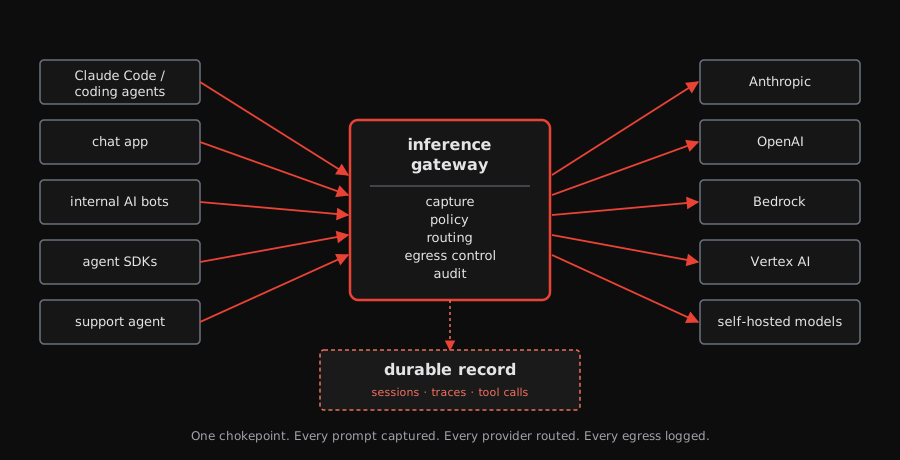
A cloud proxy is a managed gateway that multiple developers or services share. Instead of each machine running its own proxy and storing records locally, the team provisions a centralized gateway — typically backed by a proxy like Envoy and a durable store like Postgres — and points their tools at it.
The request lifecycle is the same: intercept, record, apply policy, forward. The difference is where the proxy runs and where the records live. A cloud proxy gives the platform team a single capture archive for the whole org, model allowlisting at the edge, and centralized auth — without requiring anything on each developer’s machine beyond a pointer to the gateway URL.
Most teams start with one or the other and add the second when the need arrives. A local proxy gives individual developers capture and replay immediately. A cloud proxy gives the platform team visibility, policy, and cost attribution across teams. The two compose: a local daemon can authenticate to a cloud gateway, so the developer gets a localhost endpoint while the org gets a central archive.
Where the LLM proxy fits in the Paper Compute stack
paper console provisions and manages tapes AI gateways — the cloud proxy model described above. Each gateway runs an Envoy AI Gateway instance backed by a tapes store, so every prompt, response, and tool call is captured automatically. Backends scope which models are reachable and which provider credentials to use, giving platform teams model allowlisting and flexible auth at the edge. A local daemon (paperd) authenticates to the cloud gateway and exposes a localhost proxy, so developers get a local endpoint while the org gets a central archive.
At platform scale, the same proxy-and-capture pattern becomes the foundation for an enterprise inference gateway. stereOS addresses the separate runtime-isolation problem for high-risk agents.
paper is currently in development. Sign up for the waitlist to get early access.