

Definition
AI session capture is the practice of recording model requests, responses, tool-call payloads, and metadata from AI tools into a durable, queryable archive, often at the proxy layer rather than inside each individual tool.
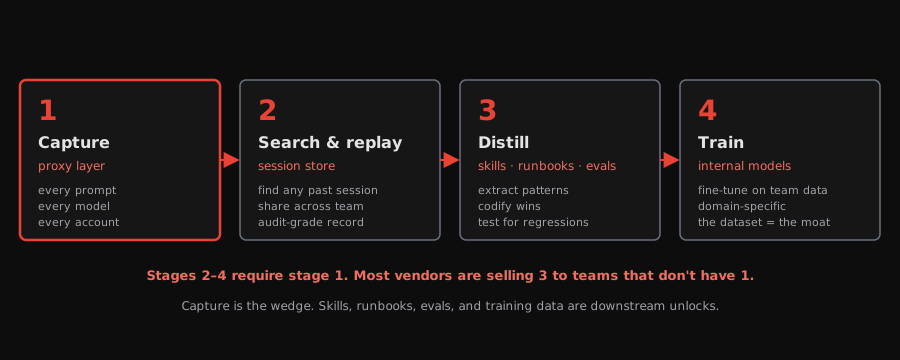
A captured session is a behavioral record of the AI traffic that usually disappears: prompts, responses, tool-call payloads, timing, tokens, and model metadata that flow through the provider/API path. Without capture, the work that just happened is gone the moment the user moves on. And on a team running agents against production systems, what just happened is the asset. Capture is the practice that turns AI sessions from disposable chats into the queryable substrate the rest of the platform — replay, telemetry, governance, skills — runs on top of.
What AI session capture records on every turn
| User prompts | Messages included in the provider request, preserved as part of the captured conversation history. |
|---|---|
| Model responses | Assistant outputs returned through the proxy, including complete responses reconstructed from streaming where supported. |
| Tool calls | Tool-use events visible in the provider/API payload, including arguments and returned results where the integration exposes them. |
| Request context | System instructions, prior messages, tool definitions, and other serialized context included in the provider request. |
| Metadata | Model, provider, token usage, cache/token accounting, session tags, and other integration-specific fields. |
Why AI session capture matters for engineering teams
Without capture, AI sessions are write-once experiences. The user types, the model responds, the work happens, and the trail is whatever the user remembers and copy-pastes.
Five engineers each running ten agent sessions a day produce fifty sessions of potential knowledge; without capture, they are unreviewable by the next person. That’s institutional memory leaking out of the system every day.
The cost of “the session is gone” compounds. The same problem gets solved twice. The same prompt gets typed by the second engineer, three weeks later, slightly differently, with a worse outcome. The institutional knowledge that the agent already produced never makes it past the user who saw it.
What AI session capture is not (scrollback, vendor history, app logs)
Capture is a specific technical practice with a specific output. Several adjacent things look like capture from a distance but produce thinner artifacts that don’t survive the same way or carry the same structure.
| Practice | Captures | Survives |
|---|---|---|
| Scrollback | Whatever fits in the terminal buffer | Until the buffer rotates |
| Vendor history | Conversations the vendor stores | Until the vendor changes retention |
| Application logs | Discrete events the app chose to log | Until log retention expires |
| Session capture | Model requests, responses, tool-call payloads, and metadata | As long as the archive does |
The defining property of capture is completeness with structure. Scrollback has completeness without structure. Application logs have structure without completeness. Capture has both, and that combination is what makes the rest of the platform possible. Capture does not equal governance, but it gives governance systems the record they need to inspect, enforce, audit, and prove behavior.
Where AI session capture happens — proxy layer vs SDK
The two dominant places to capture are inside the tool (an SDK or hook) and outside the tool (a network proxy). Both work; the proxy generalizes across tools, the SDK sees more state inside one tool.
- Inside the tool. The tool exposes a hook or callback. Every call passes through the hook, which writes to the archive. Pros: deep introspection, including non-network state. Cons: must be integrated per tool; tools without hooks are uncovered.
- Outside the tool. A proxy on the network path between the tool and the model provider. Every call passes through the proxy, which writes to the archive. Pros: framework-agnostic — any tool that can be pointed at a custom API base URL is captured the same way. Cons: can’t see in-process state the tool didn’t send.
The tradeoff is scope: proxy-layer capture sees what crosses the provider boundary. If the tool keeps local state that never enters the model request, the proxy cannot capture it.
For platform teams trying to capture across many tools, the proxy pattern wins on coverage: one integration captures every tool configured to use the gateway URL.
What a captured AI session looks like at the record level
session: 426 messages, 10 calendar days (one user)
├── 5 active days
├── 36 user prompts
├── 419 sonnet-4-6 messages
├──   4 haiku-4-5 messages (model fallback)
├──   2 in-session context-reset events
├──   5 image references in prompts
└── 13.0M prompt tokens / 0.12M completion tokens
The numbers above describe one user’s archive — pulled to make the shape concrete, not to imply every session is this size. Every line is a queryable property of one record: the 2 in-session context-reset events (moments where the agent ran out of context and silently restarted) are detectable from the archive, (even if they were easy to miss in real time), the 5 image references are addressable, and the model breakdown reveals which calls fell back to a cheaper tier. None of that detail exists without capture.
How much detail AI session capture should preserve to be useful
Pulled from one user’s captured session: an activity signature of 17 blog-writing prompts, 13 CSS/visual-design prompts, 12 image and screenshot prompts, 7 git or PR prompts, and 15 install or run-local prompts. The categorization is only possible because every prompt is recorded with full text, not summarized — and even one user’s archive shows the shape of the work.
Capture isn’t useful at every granularity. “We made an AI call” is metadata. “We sent this 3,769-character prompt at this timestamp and got this response back” is a record. The difference is that the second one supports the queries that matter — what was the agent actually doing, where do the recurring patterns live, which prompts produced bad outputs?
The granularity rule is: capture enough that an engineer six months later can answer the question without asking the original user. That standard rules out summaries and rules in full prompts and responses.
How paperctl CLI performs AI session capture for coding agents
paperctl CLI uses tapes, Paper Compute’s open-source telemetry/capture layer, to route agent traffic through a proxy and write captured session records to a durable archive. Each model request, response, and tool-call payload becomes a record; the archive is queryable, searchable, and replayable. From the user’s perspective, capture is invisible: paperctl start claude launches Claude Code with the proxy pre-configured, and a complete record of the session lands locally. Codex and Pi launch the same way (paperctl start codex, paperctl start pi).
The output is not just logs. It is a durable record engineers can search, replay, inspect, and turn into reusable knowledge — read by agent session replay, synthesized by telemetry for agents, and operated at company scale through AI platform engineering.
Why AI session capture is critical infrastructure in 2026
A year ago, “lose the chat history” was a small annoyance. Today, agents do hours of substantive work on real systems. The 10-day, 426-message session diagrammed earlier is one user’s slice of what an engineer accomplished that week — and the same shape repeats across every other engineer running agents that week. Treating that as ephemeral — to be summarized, partially screenshotted, or reconstructed from memory — is the same mistake teams made before version control became non-negotiable. The artifact is the asset. Capture is the part that turns it into one.
How Paper Compute enables AI session capture today
paperctl CLI is the LLM proxy that performs AI session capture by default. Install once on a laptop with curl -fsSL https://download.papercompute.com/install | bash, run paperctl start claude, and every Claude Code call on that machine is captured into a local archive. Codex and Pi are captured the same way, and tools that don’t launch from a terminal can route through paper persistently. The capture archive is the foundation; agent session replay, telemetry, and the broader enterprise inference gateway are what platform teams build on top of it.
If the agent figured something out and no one can replay it, the team still has to learn it again.
Frequently asked questions
What is AI session capture?+
Does AI session capture only apply to coding agents?+
Where does AI session capture happen — inside the tool or at the proxy?+
What gets captured for streaming responses?+
Is captured AI session data sensitive, and how is it protected?+
Does AI session capture replace observability?+
Where to go next
Related resources
Paper Compute
- Agents Need Black Box Recorders
- Dreams, Reflections, and Inceptions
- What is in a High-Fidelity trace?
- Stop Trusting Skills You Haven't Measured
- Stop Writing Skills from Memory
- Deep dive: using tapes for agent datasets
- Tapes: Free and Open AI Data
- Turn Your Agent Sessions Into Skills
- AI Companies Know Your Data Is Valuable. Why Doesn't Your Team?